From a desk to The Things Network: standing up my own gateway
There's no community LoRaWAN gateway within thirty kilometres of Corby, so the only way onto The Things Network was to build the gateway myself: a Waveshare SX1303 HAT, a veteran Raspberry Pi 4, and a current Raspberry Pi OS where most of the published recipes have stopped working.
The plan for this phase was the lazy one: borrow somebody else's gateway. The Things Network is a public network, and the usual advice is to lean on a nearby community gateway for your first join before you build your own. So before anything else I checked the map.
There is nothing near me. On the TTN coverage map the closest gateway to Corby sits about 30 km away, out toward Peterborough; the next handful are 33 to 38 km off in other directions. At those distances, from a desk, indoors, there is no link to borrow. Corby is a TTN desert.
That turned a shortcut into the actual lesson. To get onto the network at all I had to put a gateway on the air myself, which is a better post anyway. This one ends when my own gateway shows a green dot in the TTN console. The device that joins through it is the next post. Here it's just the gateway, the whole chain from a bare SD card to a live network connection.
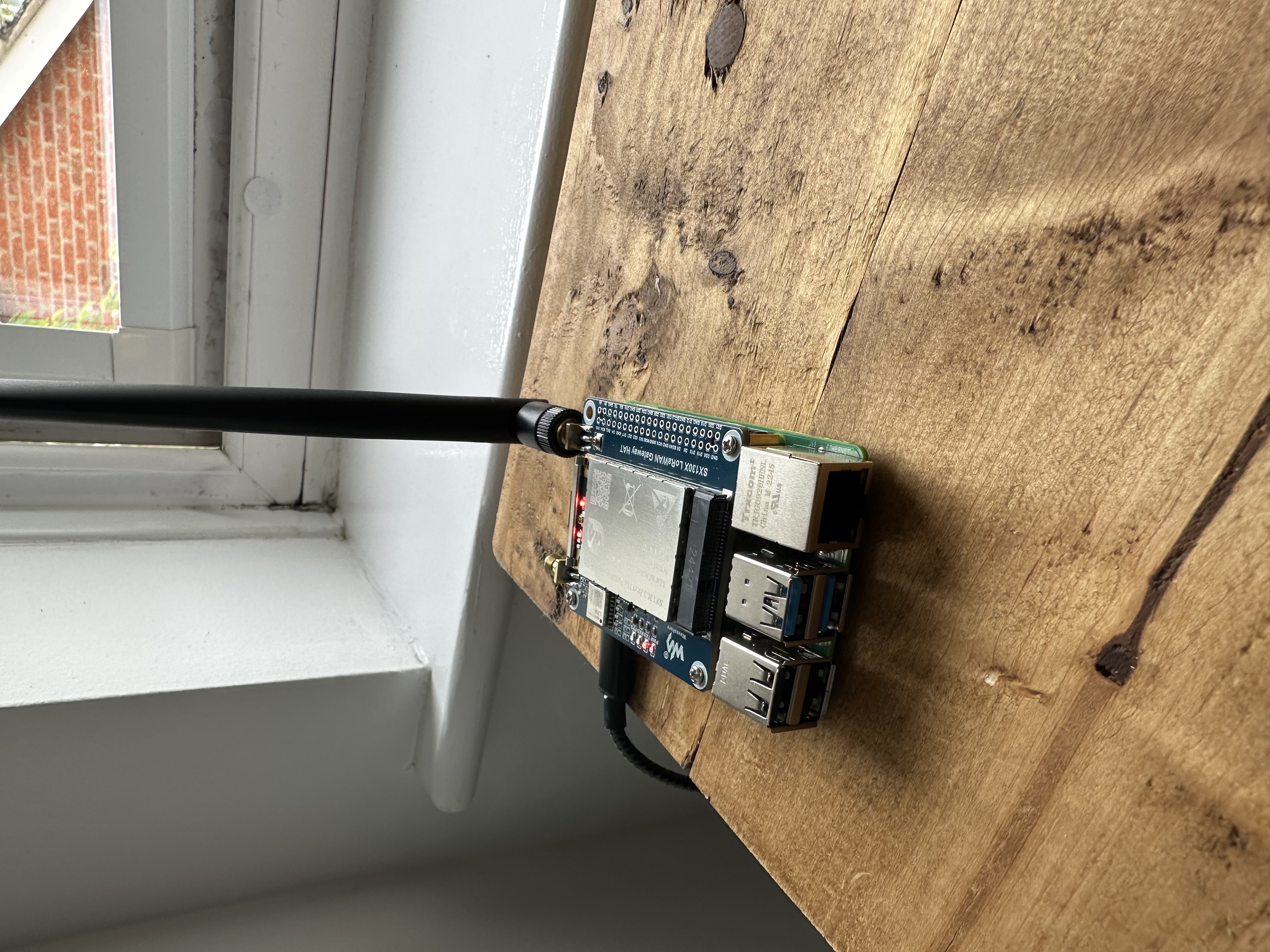
Why a Pi 4, and why a HAT is not a "single-channel gateway"
The concentrator is a Waveshare SX1303 868M LoRaWAN Gateway HAT, the "(B)" baseboard. The chip that matters is the Semtech SX1303: an 8-channel concentrator, which is what makes it a real gateway. A cheap single-channel listener parks one radio on one frequency and one spreading factor and calls itself a gateway; it hears only the fraction of traffic that happens to land on its single setting. The SX1303 watches eight channels across all spreading factors at once. That difference is why you buy this class of board.
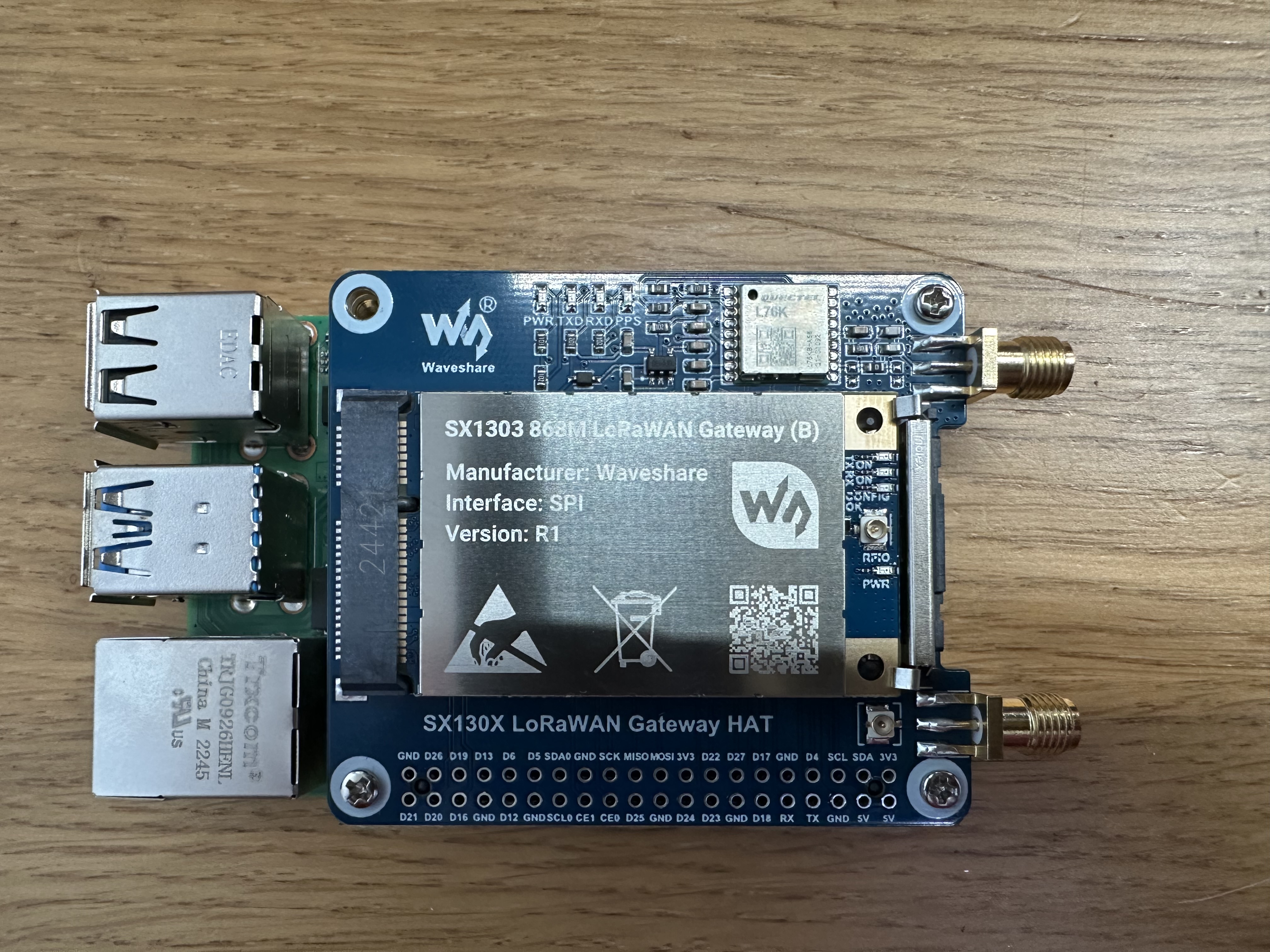
I ran it on a Raspberry Pi 4, not the Pi 5 I'll use later for the network server. Two reasons. Waveshare's own wiki is written against the Pi 4 and warns that the Pi 5 needs GPIO changes, so there are fewer surprises on the documented path. And keeping the gateway on its own Pi leaves the Pi 5 free to host ChirpStack in a later phase, which is how you'd want those two jobs separated anyway.
The Pi 4 is a veteran with bent header pins from years of abuse, so the HAT didn't slip on cleanly; I straightened them first. Worse, an old heatsink sits exactly where the HAT's GPS-backup battery slot wants to be, so one mounting corner won't screw down and the board sits very slightly proud. I noted it and carried on. Hold that thought.
The plumbing: three interfaces, and what each is for
Fresh Raspberry Pi OS Lite, 64-bit. The current release, by 2026, is a Debian Trixie build. That word matters more than it should, and I'll come back to it. First, three things to switch on in raspi-config:
- SPI is the fast data path between the Pi and the SX1303. The concentrator is an SPI peripheral; the gateway software opens
/dev/spidev0.0to talk to it. No SPI, no gateway. - I2C is a slow side-channel for small housekeeping chips. You'd think a LoRa gateway has no use for it, but this HAT follows Semtech's reference design, which hangs a temperature sensor off I2C, and the gateway software refuses to start if it can't read that sensor. So it's not optional.
- Serial stays half-on: the HAT's GPS sends data over the Pi's UART, so I kept the serial hardware enabled but disabled the login console that normally uses it, or the two fight over the port.
A reboot later, /dev/spidev0.0 was present and the interfaces were live. That's the easy part. Then the build.
Where the tutorials break
I went with LoRa Basics Station, the modern packet forwarder, built for the corecell platform that matches the SX1302/SX1303 family. The build cloned its dependencies and then died:
setup.gmk:60: No toolchain for platform 'corecell' and local arch is not 'arm-linux-gnueabihf'
...
make[4]: NO-TOOLCHAIN-FOUND-gcc: No such file or directory
This is the first place a current OS bites. Basic Station's build files only know the 32-bit ARM toolchain name, arm-linux-gnueabihf. A 64-bit Raspberry Pi OS reports its compiler as aarch64-linux-gnu, the two don't match, no cross-toolchain is installed, and the build then substitutes a compiler called NO-TOOLCHAIN-FOUND-gcc, which of course does not exist. The fix is one line in setup.gmk: tell it the corecell platform's architecture is the Pi's native 64-bit one, so it builds with the system compiler. After that it compiled cleanly, labelled [aarch64-linux-gnu] the whole way down, and produced a station binary reporting version 2.0.6(corecell/std).
The second broken spot is the concentrator reset. The SX1303 has to be pulsed on a reset line before the software starts, and Basic Station doesn't do it for you, so you supply a small script. Every script you'll find online, including the current upstream one, drives that pin through the old /sys/class/gpio interface:
./reset_lgw.sh: cannot create /sys/class/gpio/gpio17/direction: Directory nonexistent
That interface is dead on Trixie's kernel. The modern way is libgpiod and its gpioset tool, and the command syntax changed again at libgpiod v2, which is what Trixie ships (v2.2.1 here). So the reset script had to be rewritten twice over: sysfs to gpioset, and v1 syntax to v2. One more board-specific detail: the generic Semtech reference uses GPIO23 for reset, but this Waveshare "(B)" board uses GPIO17. Wrong pin, and the chip never resets.
Onto the network
With the binary built and the reset working, Basic Station needs four small files: a station.conf describing the radio hardware (the channel plan itself comes down from TTN, so this file barely changes), the address of TTN's server, the CA certificate to trust its TLS, and an API key to authenticate. The one that trips people is the key file: it must end with a Windows-style CRLF line ending, or Basic Station rejects it as a "malformed auth token", and a plain text editor won't give you that by default.
The gateway's identity on the network is its EUI, a 64-bit ID that Basic Station derives from the Pi's Ethernet MAC address (here, D83ADDFFFE5A020B). Register that EUI on TTN, pick the Europe 863-870 MHz frequency plan, and the gateway is enrolled but still dark. Start the software and the log tells the story:
chip version is 0x12 (v1.2)
found temperature sensor on port 0x39
Concentrator started (2s360ms)
Configuring for region: EU868 -- 863.0MHz..870.0MHz
chip version is 0x12 is the SX1303 answering correctly over SPI. The temperature sensor is the I2C check passing. Concentrator started in 2.36 seconds is the radio alive. And Configuring for region: EU868 only happens after TTN accepts the connection and pushes the channel plan back down, so that line is proof the gateway is talking to the network. The console went green: connected.
A few log lines on the way looked like failures and weren't. Each cost me a minute before I worked that out:
Looks like an error, isn't
SSL - peer notified ... connection going to be closed: the normal two-step handshake. Basic Station hits a discovery endpoint, gets handed the real traffic URL, and that first socket closes by design.Beaconing suspend - missing GPS data: expected. No GPS fix indoors, and Class-B beaconing isn't needed here.Ignoring unknown field: antenna_gain: harmless leftover, not a Basic Station setting.
Actually stopped it
Radio device '/dev/spidev0.0' in use by process: a second copy of the software fighting the first for the concentrator.chip version is 0x05 ... failed to setup radio 0: a garbage SPI read. The chip wasn't answering properly.
The two failures that taught the most
The connection wasn't clean on the first proper run, and the two ways it broke taught me more than the parts that worked.
The first: I launched the software by hand to test it, then launched it again without the first copy having fully exited. Two processes, one concentrator, and only one can own the SPI device. The second died complaining the radio was in use, the console flipped to disconnected, and because each launch overwrote the log I kept seeing only the corpse, not the survivor. The fix is to stop hand-launching it and let the system run exactly one copy as a managed service. That also means it comes back on its own after a reboot, which is what you want from a gateway anyway.
The second was nastier, and it's the reason I flagged that wonky corner earlier. After switching to the managed service the concentrator started failing to initialise, reading its chip version as 0x05 instead of the correct 0x12. A chip ID that flips between the right value and garbage is what an intermittent SPI connection looks like: a physical contact problem, not a software one. The half-seated HAT, lifted by that heatsink, was making and breaking contact on the header. A full power-down, a firm reseat with real attention to that corner, and a power cycle, and it read 0x12 every time and held a steady connection. A marginally-seated board reads as a software failure, right up until you press it down.
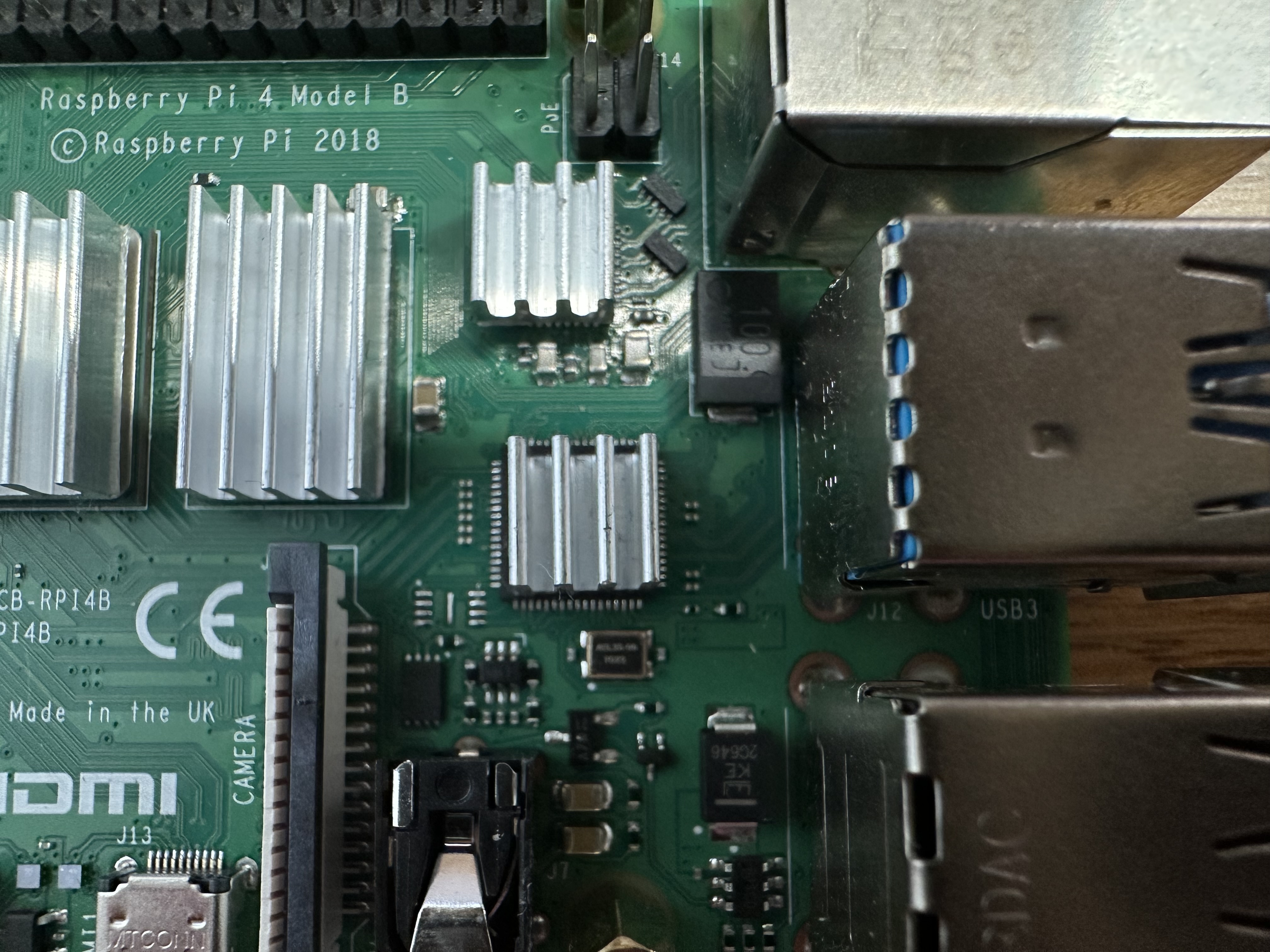
That heatsink needs to actually move before this gateway lives anywhere permanent. For now it's solid on the bench, and the console has shown a steady green connection for long enough that I trust it.
Where this leaves things
There's a gateway in Corby on The Things Network now: built, not borrowed, because there was nothing to borrow. The whole chain stands on one desk: an 868 MHz antenna into an 8-channel concentrator, the concentrator over SPI into a Pi running Basic Station, the Pi over a TLS WebSocket to TTN.
What it can't do yet is hear anything, because nothing local is transmitting LoRaWAN. That's the next post: flashing the STM32 Discovery kit as an end device and watching it join the network through this gateway. That is the first packet to travel the full path, device to my gateway to TTN and back. The companion repo below has the complete walkthrough, every command from a fresh SD card to a connected gateway, plus the reset script, the config, and the service file, with the 2026 toolchain fixes already applied, so you can stand up the same HAT without re-walking the broken tutorials. If your Pi reads a different chip version than mine, check the screws before you check the code.